
Pay & Docs is where you’ll find everything related to your pay and paperwork in one place.
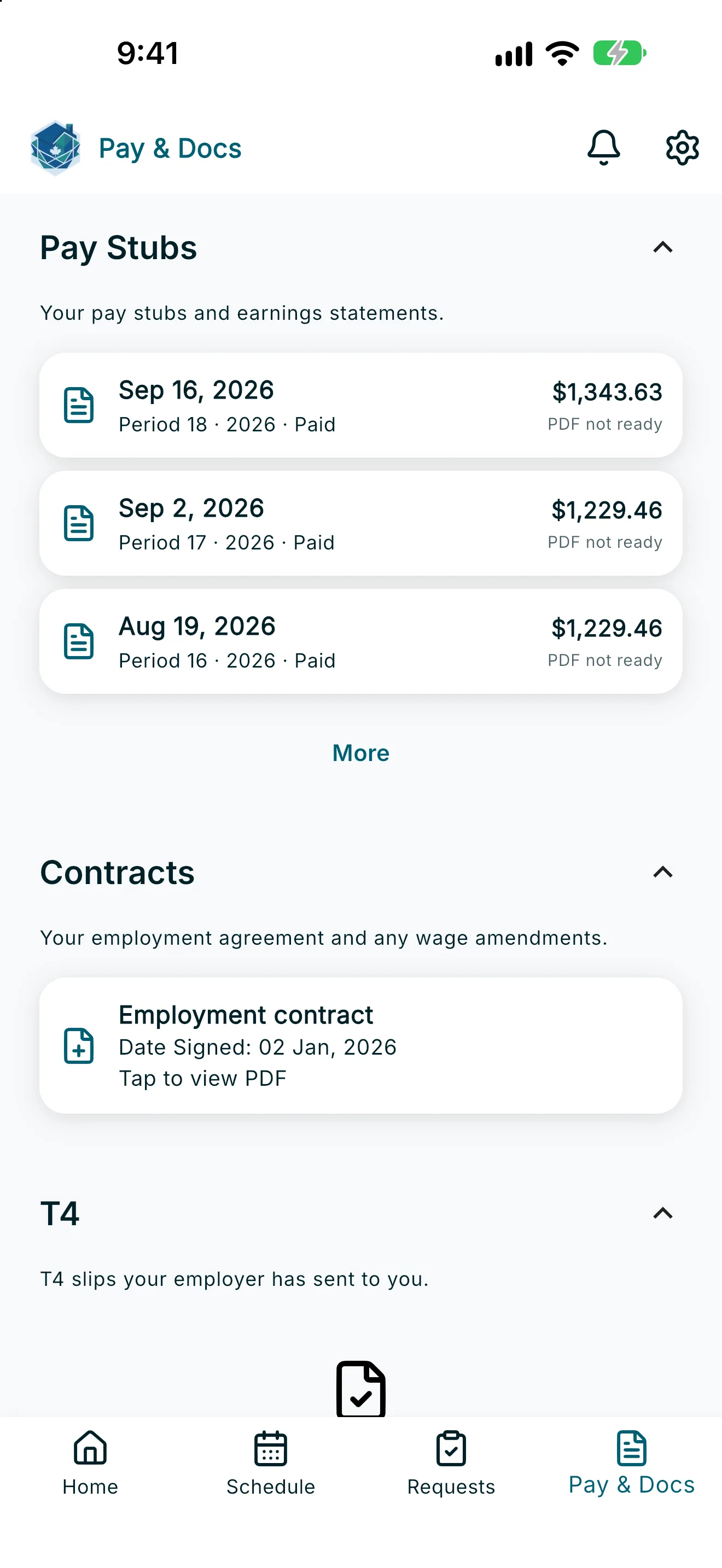
- Open Pay & Docs from the navigation menu, or tap My Pay History from the Home screen.
- Under Pay Stubs, review your pay stubs and earnings statements. Tap More to see additional pay runs.
- Under Contracts, you’ll find your employment agreement, wage amendments, pay-cycle amendments, and a Hours averaging addendum when your employer has sent one.
- If a contract or addendum is still awaiting your signature, it shows Tap to review and sign — tap it to finish signing. A pending hours-averaging addendum is titled Hours averaging addendum — awaiting your signature.
- Under T4, you’ll find T4 slips your employer has sent you. A T4 only appears here after your employer sends it — if none have been sent yet, you’ll see a message that no T4 documents are available yet.
- Under TD1, you’ll find your submitted federal and provincial tax declaration forms.
- Tap a document, then Tap to view PDF to open it.
- Tap Download PDF to save a copy.
Note: Tax documents contain your personal tax information. Only download or save them somewhere you can keep private and secure.
If you don’t have any documents in a section yet, you’ll see a message like “No employment contract on file yet” or “No tax documents yet.”