2026 Canadian Nanny Payroll Guide • Updated Q4 2026

The Best Nanny Payroll Software in Canada

Hiring a nanny or caregiver means keeping track of hours, figuring out taxes, and paying by the rules. Compare dedicated household apps, full-service payroll agencies, QuickBooks, and spreadsheets on price, day-to-day features, and your weekend time.

RoostPay: $24/mo or $228/yr ($19/mo)
Save $300 to $500/year vs payroll agencies
No charges for 30 days Unlimited employees included Cancel anytime
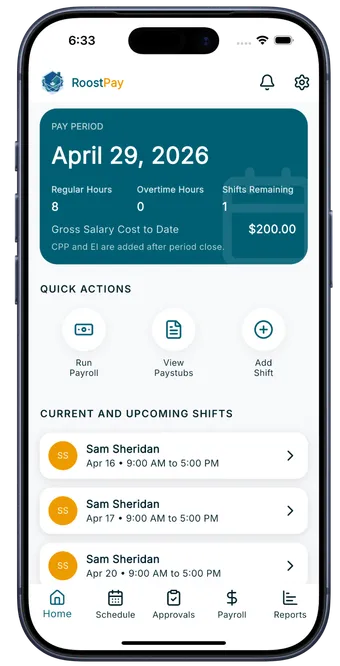
RoostPay mobile app running Canadian nanny payroll, showing pay periods, hours, and upcoming shifts

Accurate 2026 Taxes

CPP, EI, stat pay & T4

Phone & Web Portal

iPhone, Android & desktop

The Quick Verdict: Which Option Fits Your Family?

Here is how the four options compare for Canadian parents, at a glance.

Summary Definition

What is the best nanny payroll software in Canada? Dedicated household software like RoostPay is the best overall choice for Canadian parents. Unlike commercial accounting tools or traditional payroll bureaus, household payroll software combines synchronized shift scheduling, automated provincial overtime and stat holiday math, CRA deductions (CPP, EI, tax), and year-end T4 preparation into an easy mobile app and web portal designed specifically for families.

Best Overall for Parents $24/mo

RoostPay App & Web

Built for parents, not business accountants. Shared scheduling, mobile shift requests, receipt scanning, accurate tax calculations, and T4 preparation. You pay your nanny with a quick Interac e-Transfer.

Free 30-Day Trial See Details
Agency Service $40–$60+/mo

Payroll Bureaus

Agencies like HeartPayroll and NannyTax handle direct deposits and send tax payments directly to the CRA. However, you still have to track daily hours yourself and send them in, and fees run $500 to $720+ per year.

Best if you want someone else sending CRA cheques
Commercial $28–$40+/mo

QuickBooks Payroll

Built for commercial offices with staff accountants. Lacks household nanny contracts, room and board calculations, and easy family scheduling. Overly complex for household needs.

Best if you already have a corporate bookkeeper
Zero Software Fee $0

CRA PDOC & Spreadsheets

Free government tax tool. Does not store records, track vacation, calculate stat holiday pay, or create pay stubs. Expect to spend 30 to 40 hours of your weekends each year doing manual math.

High personal time and math mistake risk

Complete Side-by-Side Comparison Matrix

Compare pricing, day-to-day household tools, tax help, and how much of your time each option actually takes.

Feature or Task
RoostPay Recommended
Payroll Agencies HeartPayroll, NannyTax Small Business Tools QuickBooks, Wagepoint DIY Spreadsheets CRA PDOC & Excel
Monthly Cost
$24/mo or $228/yr
($19/mo equivalent, covers all household staff)
$40 to $60+ / month ($500 to $720+/yr) $24 base + $4 to $6 / worker / mo $0 software fee (high personal time)
Shared Shift Scheduling
Built-in shared calendar (app & web)
Nanny logs hours on phone; you approve in 1 tap
None (you track on paper, text, or spreadsheets) Complex commercial shift scheduling add-on Manual notes or custom spreadsheet
Overtime & Stat Holiday Pay Math
Calculated automatically by province
Applies daily/weekly thresholds when shifts are approved
You must calculate hours/eligibility before sending Requires manual rule setup for household rules You research provincial rules and calculate by hand
Time-Off & Vacation Tracking
In-app vacation requests & balances
Nanny requests time off; vacation pay tracks automatically
Managed over text/email; you report used days Basic business employee portal You track days and 4% to 6% accruals manually
Expense Receipts (Groceries, Outings)
Photo receipt scanning in app
Nanny snaps a photo; reimbursed on next pay run
Not supported (you handle receipts & reimburse separately) Corporate expense receipt add-ons Separate cash or e-Transfer reimbursements
Where You & Your Nanny Access It
iPhone, Android, and web portal
Full access on mobile or computer for both of you
Desktop website portal or email/phone Desktop web and business accounting app Spreadsheet files on your home computer
CRA Deductions (CPP, EI, CPP2, Tax)
Automated 2026 brackets & CPP2
Always up to date when federal rates change
Calculated by agency staff Automated (designed for commercial businesses) Manual calculation every pay period on CRA PDOC
T4 Slip & Summary at Year-End
Prepares complete T4 slips ready to file
Zero year-end processing fees
Included or extra year-end fee ($50+) Standard business T4 export You calculate every box on the T4 by hand
CRA Remittance (Tax Payment) Help
Exact remittance amount & due date alerts
Pay in 30 seconds via online banking bill pay
Debited from your account via escrow transfer Shows business payroll tax liabilities You calculate remittances & set your own reminders
Itemized Digital Pay Stubs
Automated pay stubs in nanny app & web
Shows hours, stat pay, vacation, and deductions
Emailed PDF or desktop web portal login Intuit Workforce employee portal Manual spreadsheet printout or homemade PDF
How Your Nanny Gets Paid
Exact take-home pay via Interac e-Transfer
Instant payment directly from your bank on payday
Direct deposit (funds debited 3 to 5 days early) Direct deposit or paper cheque Interac e-Transfer, cheque, or cash
Time You Spend Each Pay Run
Under 2 minutes
Hours are already logged; tap approve and e-Transfer
15 to 30 minutes (you still track & tally hours first) 20 to 30 minutes (navigating corporate ledgers) 45 to 90 minutes of spreadsheets and formulas

* RoostPay prepares your nanny's T4 slips and T4 Summary and works out the exact net amount so you can send an Interac e-Transfer from your bank.

Try RoostPay free for 30 days →

Detailed Breakdown of Each Option

How each option works day-to-day for Canadian parents, what they cost, and where they save or cost you time.

1. Best Overall for Canadian Families

RoostPay (App & Web Portal)

$24/mo or $228/yr
Free 30-day trial • No setup fees

RoostPay was created specifically for Canadian households hiring a nanny, au pair, or senior caregiver. Instead of treating your home like a corporation, RoostPay provides shared shift scheduling, time-off requests, and receipt scanning for kid expenses. Both you and your caregiver can use the iPhone and Android mobile apps or log in via your computer.

Why Parents Love It

  • • Shared shift schedule: Caregiver clocks shifts; you approve hours in one tap on your phone or computer.
  • • Automatic overtime & holiday pay: Never calculate stat pay formulas or overtime rules by hand again.
  • • Photo receipt scanning: When your nanny buys groceries or museum passes, they snap a photo in the app for automatic reimbursement.
  • • Prepares complete T4 slips: Ready for you to submit to the CRA at tax time with zero extra charges.
  • • Interac e-Transfer: Pay take-home pay instantly from your own bank on payday. No escrow holds.

Good to Know

  • • You send the e-Transfer: RoostPay tells you the exact net amount; you send it from your personal online banking.
  • • Built for English common-law Canadian provinces (BC, ON, AB, SK, MB, NS, NB, NL, PE).

Best for: Busy parents who want shared scheduling, receipt tracking, and complete Canadian tax peace of mind without paying $500 to $700+ to an agency.

Start Free 30-Day Trial
2. Traditional Payroll Agency

Payroll Bureaus (HeartPayroll, NannyTax)

$40 to $60+/mo
$500 to $720+ per year (plus add-ons)

Agencies like HeartPayroll and NannyTax have helped Canadian families for years. You grant them third-party banking access so they pull payroll funds from your account, direct deposit your nanny's paycheque, and send monthly tax remittances directly to the CRA on your behalf.

The Advantages

  • • They remit payments to the CRA directly from their escrow holding accounts.
  • • Direct deposit handles the money transfer without you sending an e-Transfer.

The Drawbacks

  • • You still calculate the hours: Agencies do not provide shift scheduling apps. You still have to tally hours, calculate overtime eligibility, and submit numbers each pay period.
  • • No receipt or expense tracking: If your nanny buys kid groceries or supplies, you have to collect physical receipts and reimburse them out of pocket separately.
  • • Significantly more expensive: HeartPayroll charges $50/mo ($500 to $600/yr), plus $10/mo ($120/yr) if you want workers' compensation filing in BC or Ontario. NannyTax packages range from $39 to $59/mo ($468 to $708/yr).
  • • Banking hold times: Direct deposits require funding your escrow account 3 to 5 business days ahead of payday.

Best for: Families with larger budgets who want a third-party company to write cheques to the CRA and do not mind tracking hours and receipts on their own.

3. Business Accounting Software

Small Business Software (QuickBooks Payroll, Wagepoint)

$28 to $40+/mo
Base software fee + monthly employee charge

QuickBooks Online Payroll and Wagepoint are standard tools for corporate businesses. They calculate standard Canadian business tax tables, but their interfaces are built for commercial accountants managing corporate charts of accounts and balance sheets.

The Advantages

  • • Integrates into corporate bookkeeping and business tax returns.
  • • Strong if you have multiple commercial employees in an incorporated company.

The Drawbacks

  • • Steep learning curve: parents have to set up liability ledgers and business payroll items.
  • • Not built for households: no nanny employment contracts, no room & board deduction math, and no simple family scheduling.

Best for: Business owners who already pay for QuickBooks for their company and have an accountant running their payroll.

4. Zero Software Cost

DIY (CRA Online Calculator & Excel Spreadsheets)

$0 software fee
30+ hours of personal spreadsheet work per year

The Canada Revenue Agency offers a free tool called PDOC (Payroll Deductions Online Calculator). You enter gross wages each pay period, and PDOC outputs the income tax, CPP, and EI deductions. However, PDOC does not store records, calculate stat holiday pay, track vacation pay, or create pay stubs.

The Advantages

  • • Zero financial software cost. Directly uses CRA formulas.

The Drawbacks

  • • No saved data: every single payday, you have to re-enter all caregiver information from scratch.
  • • Manual pay stubs & T4s: you must design your own pay stubs and calculate every box of the T4 by hand in February.
  • • Mistake risk: errors in second-tier CPP2, vacation pay percentages, or stat holiday formulas leave you liable for CRA penalties.

Best for: Parents with accounting backgrounds, zero variation in hours, and plenty of weekend time to create pay stubs and spreadsheets.

What Canadian Parents Need to Know When Hiring a Nanny

Paying a caregiver on the books gives you legal peace of mind and lets you claim child care tax deductions. Here is what you need to take care of.

Your Nanny is an Employee

In Canada, in-home nannies and caregivers cannot be hired as independent contractors. Because they work in your home and on your schedule, the CRA considers them employees. That means you are responsible for withholding taxes, CPP, and EI, and giving them a T4 slip each year.

Your Employer Costs

On top of your nanny's gross hourly wage, you contribute 1.4 times their EI amount, match their CPP contributions dollar for dollar (including the enhanced CPP2 tier on higher earnings), and provide vacation pay (minimum 4% or 2 weeks).

Workers' Compensation

Provincial boards like WorkSafeBC in BC, WSIB in Ontario, and WCB in Alberta require household employers to register and cover in-home workers. RoostPay tracks your payroll totals so annual workers' compensation reporting is quick and simple.

Want to see the exact employer numbers for your province? Use our free Canadian nanny tax calculator to see take-home pay, CPP matching, and employer EI in seconds.

Calculate Nanny Taxes

Everything You Need in One Clean App

From approving shifts to preparing year-end T4 slips, see how simple paying your nanny can be.

RoostPay app interface displaying accurate Canadian nanny pay run calculation with CPP, EI, and income tax

Clear Pay Run Numbers

See gross pay, employee deductions, your employer costs, and the exact take-home amount to e-Transfer on payday.

Official Canadian compliant nanny pay stub generated in RoostPay with itemized statutory deductions

Pay Stubs Right in Their App

Your caregiver receives an itemized pay stub on their phone and computer every pay period, with vacation accrual and tax history clearly shown.

CRA remittance tracking screen in RoostPay showing exact monthly payment amount and upcoming due date

CRA Tax Remittance Reminders

Know exactly how much to send the CRA and when it is due. Avoid costly 10% late-remittance penalties with automatic alerts.

Frequently Asked Questions

Common questions Canadian parents ask when comparing nanny payroll options.

How much does RoostPay cost compared to payroll agencies?

RoostPay is a simple flat rate of $24 per month, or $228 billed annually ($19 per month equivalent) with zero setup fees. Traditional Canadian payroll bureaus like HeartPayroll and NannyTax typically cost between $40 and $60 per month ($500 to $720+ per year), plus extra charges for second employees or workers' compensation filings.

Is QuickBooks good for paying a nanny in Canada?

QuickBooks is designed for commercial businesses with bookkeepers and corporate tax accounts. It does not have built-in household nanny contracts, room and board calculations, or simple mobile scheduling for caregivers. Most parents find it overly complicated for a single in-home caregiver.

Can I just use the free CRA payroll calculator (PDOC)?

The CRA online calculator is free, but it only calculates deductions for one paycheque at a time. It does not save your records, calculate stat holiday pay, track vacation pay, create pay stubs, or build year-end T4 slips. You have to re-enter every number and maintain your own spreadsheets all year.

Do I have to give my nanny a pay stub in Canada?

Yes. Across Canadian provinces, parents employing a nanny or caregiver are required to provide an itemized pay stub on or before every payday showing hours worked, pay rates, deductions, and vacation pay. RoostPay generates compliant pay stubs automatically in your nanny's app and web account.

How do I actually pay my nanny with RoostPay?

RoostPay calculates the exact take-home pay after taxes, CPP, and EI. You then send that exact amount directly to your nanny from your own bank account using Interac e-Transfer. There are no direct deposit holds and you never have to move money into a third-party escrow account.

Does RoostPay file my T4 or prepare it?

RoostPay prepares complete, ready-to-file T4 slips and a T4 Summary with every box filled in accurately. In February, you review the paperwork and submit it through your CRA My Business Account in just a few clicks, with no extra year-end fees.

Start Your Free 30-Day Nanny Payroll Trial

Join Canadian parents managing nanny and caregiver payroll with confidence. No setup fees, no contracts, and full access for 30 days.

✓ Free 30-day trial ✓ Cancel anytime ✓ Built for Canadian households